

Open Strings · the middle of the room
The neck and the loop
The neck is a scratch pad: try anything there. The loop is what the band plays. Moving chords from one to the other is most of what you do in this room.
The neck
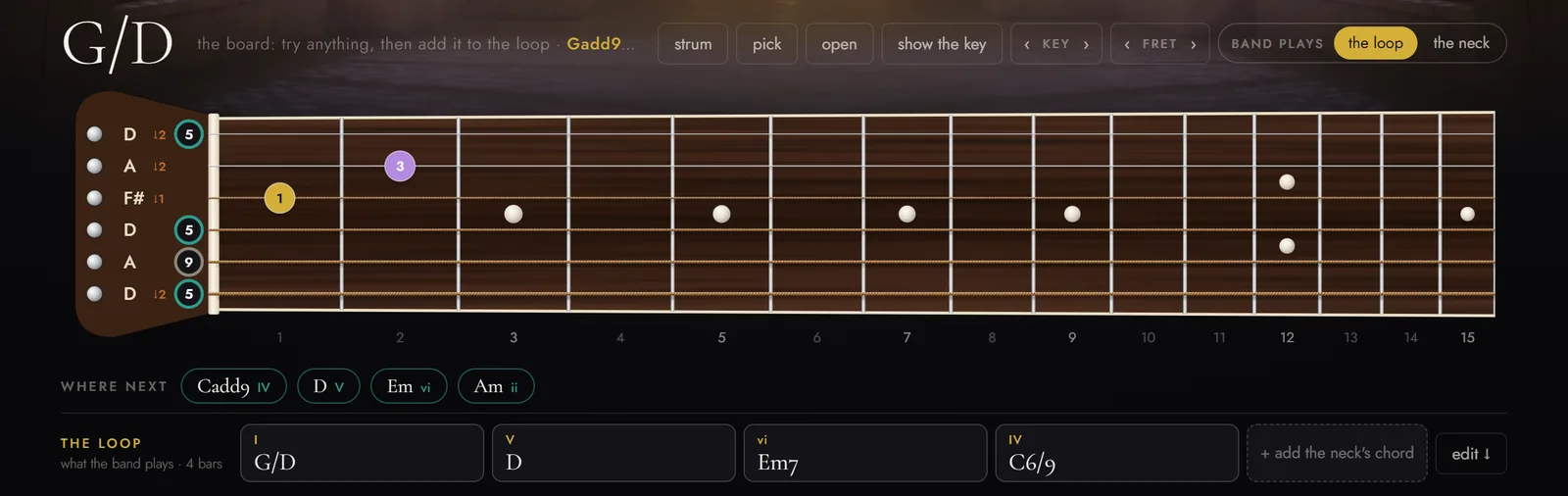
Click a fret to put a finger there and hear the string. Click the same fret again to lift it, so the string rings open. Click the white dot beside a string name to hear it open; click at the nut to mute a string (an ×) or bring it back. The big name above the neck is the chord you're holding; if the open strings change what it is, the line under it says so.
The buttons above the neck:
| strum S | Strum what you're holding. |
| pick D | Fingerpick what you're holding, at the tempo, until you press it again. It uses the fingerpicking feel you chose (Travis picking if your feel is a strum). Your hands are free: pick up the guitar and play over it, or change chords on the neck while it picks. Starting the band stops it. |
| open | Every string open: the tuning's own chord. |
| show the key | Light up every note of the key on the neck. Good for finding a melody over the loop. |
| ‹ key › ←→ | Move every fretted finger to the next note of the key. The shape changes as it goes, but it never leaves the key. |
| ‹ fret › shift+←→ | Slide the same shape one fret. The open strings stay where they are, so the chord changes colour as it moves. |
| band plays F | the loop: the band plays your loop. the neck: the band plays whatever you're holding, so you can try chords live over the groove and press Enter to keep one. |
Under the neck, Where next shows the chords that usually come after the one you're holding, in this key. Hover one to see it on the neck; click it to play it.
While the band is playing
The neck follows the band and shows the chord being played. Click a fret then and you're editing that chord of the loop, live.
The loop
The loop shows up in two places. Just under the neck is a compact row, The loop, that stays in view as you scroll: click a chord there to change it, + add the neck's chord to add what you're holding, and edit ↓ to jump to the full editor further down the page.

The full editor shows each chord as a diagram you can rearrange. The loop plays left to right, around and around, up to 16 chords.

- + add the board, + add the neck's chord or A adds what's on the neck to the end.
- Click a chord to select it. The neck shows it so you can change it, and every chord card below swaps into its place when clicked. 1 to 8 select chords from the keyboard; Esc stops swapping.
- The length at the top of each box cycles 1 bar, 2 bars, half a bar.
- Each box has ‹ › to move it, a copy button, and × to remove it (or Del).
- ↶ undo or Z goes back one change. clear empties the loop.
- Type a name and press keep it to save the loop, every section included, under Start here › yours.
- share copies a link that opens this exact loop for whoever you send it to.
Sections and form

A song is more than one loop. The Section buttons A B C D are four separate loops; the number on each is how many chords it holds, and an empty one starts fresh when you click it. Type an order into Form, like AABA or ABAC, and press play the form to have the band play the whole form instead of only the section you're on.
Play it differently

The same chords can sit on the neck in many ways. These buttons re-voice the whole loop at once without changing what the chords are. Try one, and Z if you preferred it before.
| full chords | Full shapes with open strings ringing, chosen so the hand barely moves. |
| triads | Three notes on neighbouring strings, each the inversion closest to the last. |
| drone on top | A root and 5th moving on the low strings while the top three ring open. How I play a lot of my songs. |
| top note holds | The highest note stays the same; the chords change under it. |
| top line falls / climbs | The highest note steps down (or up) chord to chord: a melody hidden in the chords. |
| notes in common | Keep as many notes ringing from chord to chord as possible. |
| home note in the bass | The key's home note under every chord, even the ones it doesn't belong to. |
| somewhere else | Same chords, same style, another spot on the neck. |
| walk the bass | Inversions picked so the lowest note moves by step. |
| higher / lower | The whole loop up the neck or toward the nut. |
| borrow a chord | Swap one chord for its cousin from the parallel key (IV becomes iv, V becomes ♭VII). The open-tuning colour. |